Join 5,901+ iOS/macOS developers using Codex and agents to build and ship apps. Expect practical tutorials, repeatable workflows, and hard-earned lessons from 7 shipped apps and time at Apple, Microsoft, and GoPro.
The Screenshot Mistake That’s Costing You Downloads Every Day
|
Hey Reader, My last app launch was a flop. I wrote the App Store copy after I’d already submitted for App Review — and I knew it. If you’re in that same boat, that’s okay. But don’t stop there. This week’s article breaks down the research workflow I should have used from the start: using AI and competitor reviews to write copy before you design a single screenshot. Read: The Screenshot Mistake That’s Costing You Downloads Every Day Grab the free 100 Best Practices for App Store Screenshots PDF while you’re there. Two Tactics You Can Steal#1 Use competitor App Store reviewsThe best App Store copy isn’t written by you. It’s sitting in your competitors’ reviews. I use my app, Review Researcher, to download 500 App Store reviews, then paste them into ChatGPT or Claude. From there, I can generate personas, pain points, and exact customer language — all from real users describing what frustrated them. #2 Build an app you want to useI built Super Easy Slides because I needed a tool to automate creating Keynote slides for my YouTube videos. Plain black backgrounds, white text, Markdown-based workflow. When you solve your own problem, you already know which features matter — because you use them every day. That makes writing App Store copy easier than guessing what a stranger wants. Fix your own problem first. You’ll likely fix someone else’s, too. Pro TipUse subagents. With GPT-5.4 Mini, subagents can work on different areas simultaneously. Just ask Codex to use “subagents” — it handles all the orchestration. No setup required. Find a bug? Ask Codex to fix it. The subagents pick back up where they left off. Gabriel from OpenAI has a great breakdown: Parallel by Default: Building with the Codex App. 5 Resources and Links
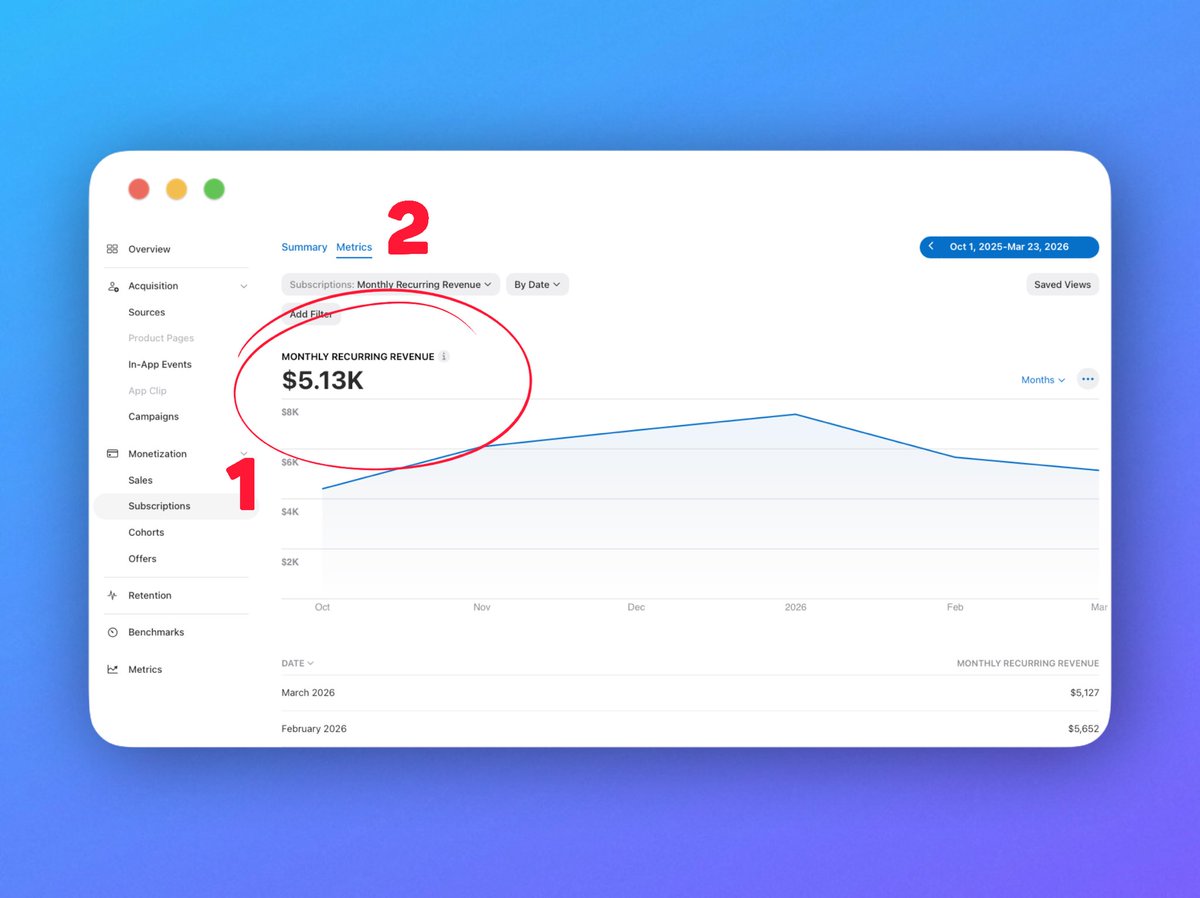
From the CommunityApple updated App Store Connect analytics — 100 new data points, including Monthly Recurring Revenue (MRR) tracking. Viktor shows what it looks like in practice (click to see the full dashboard):
Quick QuestionI’m running two live workshops this spring. Want in?
Have a question? Just hit reply. Talk soon! Paul Solt P.S. Next week I’m breaking down my full Codex + Skills workflow for building iOS apps — it’s the #1 request from my recent poll. |

AI Code Brief - Paul Solt
Join 5,901+ iOS/macOS developers using Codex and agents to build and ship apps. Expect practical tutorials, repeatable workflows, and hard-earned lessons from 7 shipped apps and time at Apple, Microsoft, and GoPro.
Hey Reader, I flew out to San Francisco to visit OpenAI. It was a whirlwind and super fun to meet the team behind the Codex app. And I was able to chat with developers to learn about their own workflows. Read: 3 Things I Learned from the GPT-5.5 Launch Party I met Ray Fernando, Sam Altman, and many other great people at OpenAI and beyond. I was inspired by some of the discussions to start work on my Codex Librarian research tools and skills. This builds upon my DocSetQuery GitHub project....
Hey Reader, Watch how I build iOS and Mac apps with Codex in 20 minutes. This is my latest Codex GPT-5.5 workflow for shipping real apps. Watch: How I Build REAL Apps with the Codex App and GPT-5.5 GPT-5.5 is really smart, but it still makes mistakes. I show this tool I use daily Get a peek look at my app's sales history See the CLI tools I'm using to find app opportunities If you need an app idea, this video is for you. I'll show you some new tools you can use to find opportunities from...
Hey Reader, My workflow with GPT-5.5 is completely different from GPT-5.4 — and this changed over the weekend. With GPT-5.4, I revived my 9-year-old Super Easy Timer app and pushed conversion from 0.5% to 7.1% over the past two weeks. This week, I had early access to GPT-5.5 and it unblocked my deprecated macOS dependencies in one shot. I wrote up exactly how I'm using the Codex app + GPT-5.5 to build iPhone and Mac apps faster — and how I'm using App Store reviews to write copy that actually...